
Booking system for developers and agencies
Build the website. Leave the bookings to us.
Appointments, classes, tickets and payments for the sites you build in Astro, Next.js or plain HTML. Embed the booking form with two lines, or build your own UI on the API. Your client runs it from their own admin. You have no plugin to update and no booking backend to maintain.
- A working booking form in two lines of code
- Payments go straight to your client’s Mollie account
- Astro, Next.js, plain HTML or WordPress
Free while you build. No account yet? One API call gets you a 24-hour sandbox.
In an Astro page
<script src="https://app.nisebookings.com/widget.js" defer></script>
<nise-booking data-key="YOUR_PUBLIC_KEY"></nise-booking>
The problem
A modern site has nowhere to put bookings.
A static site has no database, no admin and no plugins. So when a client asks for online booking, you are left with three bad options.
-
Go back to a CMS
One feature ends up choosing the whole stack.
-
Link to a scheduling page
Customers leave your design to book on someone else’s.
-
Build it yourself
Time zones, double bookings, refunds, waiting lists. Then maintenance for as long as the client stays.
nisebookings is a fourth option: a complete booking system that runs next to your site, not inside it.
How it fits
Your frontend. A booking backend you don’t host.
Your site stays as it is. The booking engine, the admin, the mails and the payments live in your client’s account. You reach them with a script tag, or from your own components through the API.
-
Your site
Astro, Next.js, plain HTML or WordPress. Static or server-rendered.
-
nisebookings
Booking engine, admin, mails and reminders, two APIs, webhooks.
-
Your client’s Mollie account
Payments land here. No card data touches your site or nisebookings.
Your client — Manages calendar, customers, payments and mail in the admin.
-
Embed or go headless
Drop in the web component and theme it with CSS variables. Or call the public API from your own components.
-
Nothing to host
The booking form talks to nisebookings directly. Your site can stay fully static.
-
Redesign freely
The bookings live in your client’s account, not in the site. Rebuild it or switch framework: the same key keeps working.
For your client
Not a calendar link. A booking system.
Everything a business would otherwise buy a plugin and its add-ons for. Plus an admin they run themselves, without calling you.
-
Appointments and resources
Each service has its own duration and price, per staff member. A staff member can also be a room, a boat or a device.
-
Classes and waiting lists
Set a maximum per session and show the seats left. When a seat frees up, the waiting list gets a mail.
-
Packages and series
Sell ten sessions up front; customers plan them through a personal link. Book weekly or monthly in one go.
-
Events and tickets
Workshops, tours and evenings with several ticket types. Every ticket has its own code.
-
Payments to their own account
A deposit or the full amount, with or without VAT, through the business’s own Mollie account. The money never passes through nisebookings.
-
Questions before booking
Intake questions per service, file uploads included. Shown only when they apply.
-
Mails and self-service
A confirmation with a calendar file, reminders if the business wants them, and a link to cancel or reschedule.
-
Calendar sync, both ways
Each staff member’s appointments show up in their own Google, Outlook or Apple calendar. Busy times in that calendar block bookings, refreshed about every ten minutes.
-
Dutch, English and German
The booking form, the mails and the cancel and reschedule pages, in the account’s language or per embed on a multilingual site. Each customer hears back in the language they booked in.
-
One admin
Calendar, customers, payments and sent mail in one place. Staff see only their own calendar.
Try it as a customer
This is the real booking form. Pick a service and a time, and fill in your details. It books into a demo account: no business sees it and nothing is charged.
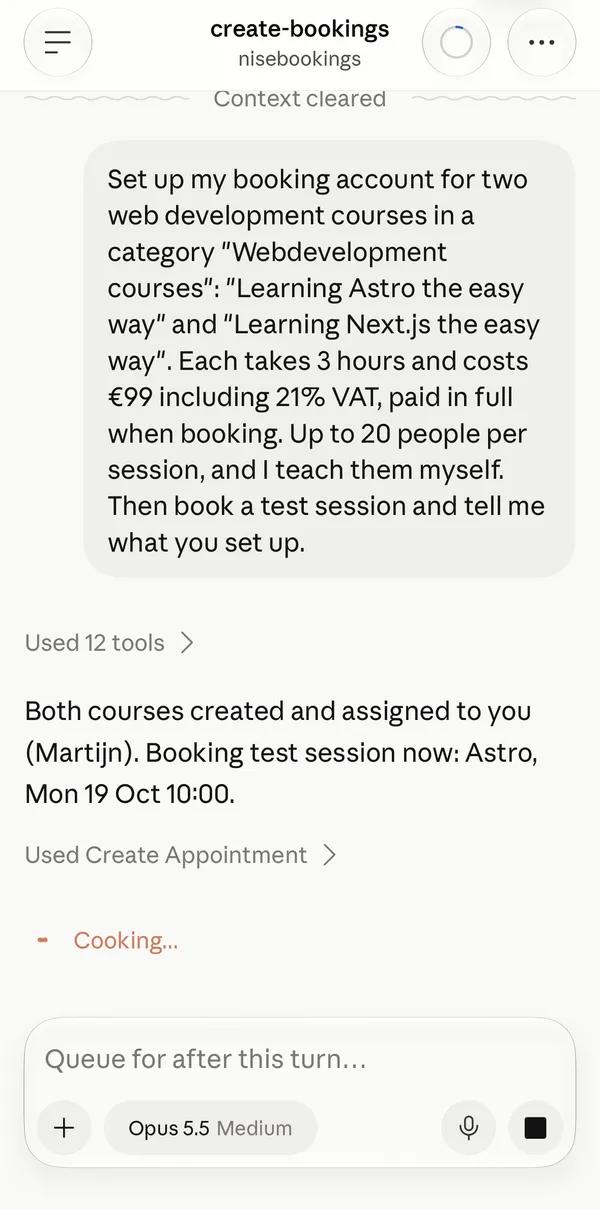
The real chat: Claude Code, connected to the MCP server, set up the two courses in this demo and booked a test session.
Not there yet: SMS and WhatsApp. Calendar sync runs on iCal subscriptions: the appointments appear in the calendar, changes go through the admin. The admin speaks Dutch and English, per person who logs in. What fits and what doesn’t
For developers
The booking backend you don’t have to build.
One backend, three ways in. Start with the component; switch to the API when the design asks for it.
-
Embed
<nise-booking> and <nise-events>: web components without dependencies, about 20 KB gzipped. They inherit your font and take their colours from CSS custom properties.
-
Headless
The public REST API, with one public key: services, slots, prices, bookings, payments and tickets. The server recalculates every price and checks every slot in a transaction, so your UI cannot oversell.
-
Configure from code
A management API with scoped keys covers the whole admin: services, staff, schedules, opening hours, customers, settings and webhooks.
- OpenAPI 3.1
- Idempotency keys on every write
- Signed webhooks with retries
- Dated API versions
- Rate limits with Retry-After
- Sandbox in one call
Try it now, no account
curl -s -X POST https://app.nisebookings.com/api/sandbox
# → a 24-hour account with a public key and an API key.
# Mail is captured, payments are fake.Coding agents
Your agent builds it, sets it up and proves it works.
Everything in the admin is also in the API and in a hosted MCP server. Claude Code, Cursor, Codex or Copilot can take over the repetitive part of every client project.
-
Prototype
It creates a sandbox and puts the booking form on your page.
-
Configure
With a key you create, it adds your client’s services, staff and opening hours.
-
Verify
It books a test appointment and reads back the confirmation mail.
-
Report
It tells you what it set up. You check it in the admin.
- 47 MCP tools
- OpenAPI for both APIs
- AGENTS.md and a Claude Code skill for your project
- Listed in the official MCP registry
The agent does the setup. What your client sells, at what price and when, stays their call. You limit every key to the job and revoke it in one click.
For agencies
One booking setup, reused on every client site.
Build the integration once: the component, the styling, the agent instructions, the setup script. Reuse it for the next client. Each client gets their own account, admin and Mollie payments.
-
No per-seat pricing
Staff, rooms and resources are unlimited in Pro and Agency.
-
An account per client
Each client has their own admin, bookings and data. Nothing mixes between clients.
-
Scripted setup
A new client’s services, schedules and webhooks come from one script or one prompt. Not an afternoon of clicking.
-
Cheaper per client
Five client accounts cost less than three Pro plans. What you charge for the booking module is up to you.
Pricing
Free while you build. Pay when your client goes live.
You pay per site, never per person. Staff, rooms and resources are unlimited in Pro and Agency.
-
Free
€ 0 per month
For building, testing and small sites.
- 50 bookings per month
- 250 customers
- 1 staff member, 1 site
- Booking form and public API
- Sandbox to build against
-
Pro
€ 19 per month
or € 190 per year
For a business that actually runs on it.
- 1,000 bookings per month
- Unlimited customers and staff
- Classes, waiting lists, packages, tickets, rentals
- Online payments through your client’s own Mollie account
- Management API, MCP server and webhooks
- Your own mails, coupons and intake questions
-
Agency
€ 49 per month
or € 490 per year
For agencies with several client sites.
- 5 client accounts included, then € 9 each
- 1,000 bookings per account
- Everything in Pro
- Switch between client accounts with one login
Every plan has the booking form, the public API and the sandbox. Pro adds the management API, the MCP server and webhooks.
Switching
Coming from WordPress and Bookly?
A well-built WordPress site is fine. The point is not that the CMS is slow. The point is choosing any stack for your next site, with the bookings outside it.
Can I keep WordPress for now?
Yes. Paste the two lines into a Custom HTML block, or use the plugin. Rebuild the site later and the bookings stay where they are.
Does it do what Bookly does?
Most of the engine: capacity, waiting lists, packages, series, extras, compound services, events, deposits, coupons and calendar sync. Not yet: SMS, locations, gift cards and invoices.
Can I import my Bookly data?
There is no import button. A script or a coding agent rebuilds services, staff and schedules through the management API. Let upcoming appointments run out in the old system.
Does my client have to learn something new?
Yes, a separate admin. Everyone who logs in uses it in Dutch or English.
Put bookings on your next site.
Start free and build against a sandbox. Pay once your client takes real bookings.
Free account. All you need is an e-mail address.